
Images can be really important for your SEO efforts and can heavily enhance your rankings on Google and other search engines. However, if you do not optimize them well, it can negatively impact the rankings. Badly optimized and especially the oversized images will put a load on your hosting resources while making your page loading speed worsened.
Most people over-complicate the processes but it is really very simple to optimize your images for speed and search engines. We are going to cover the most important things in this article if your website is on WordPress.
I have been working on wordpress websites for many years and I understand the ways to optimize our images without losing their quality. And it is not only about compressing them but to use different steps related to its content and formatting. So, without any further delays, let’s get started with the methods.
1. Choose the Right File Format
JPEG and PNG are the best file formats for photos, graphics, and complex images. Although both of these are popular on the internet, they generally make images heavy and this can end up increasing your load speed and destroying the user experience. They can take longer times to load and put unnecessary load to your resources.
JPEG is ideal for photographs or images with lots of colors or gradients because it provides good enough compression while retaining quality. But, it doesn’t support transparency. For that, PNG works best. It is ideal for graphics, logos, or images that require transparent backgrounds. It offers lossless quality but generally result in larger file sizes.
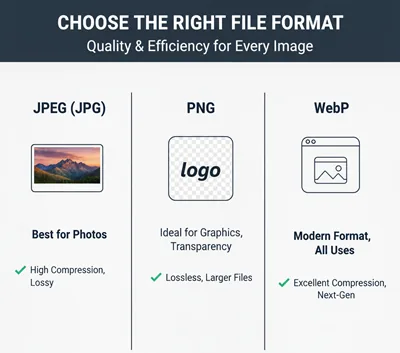
WebP is a modern format that offers excelletn quality and very small image sizes. Most browsers support it and WordPress also has built-in WebP support. It is better to change the format before uploading. However, you can also choose various WordPress plugins to do this thing automatically for you. So, for any kind of web publishing like landing pages, articles, or blogs, WebP is considered a best format to optimize the images for both SEO and user-experience.
2. Resize Before Uploading
Uploading high resolution images directly from your phones and camera could be one of the biggest mistakes you can make. An images 4000px wide is unnecessary for most purposes on your site because after a point, it doesn’t add much to the visible details but surely increase the size.
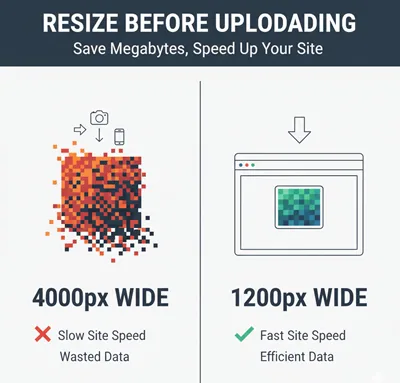
For this, resize your image for the maximum dimensions needed for your theme before you upload them. Every extra pixel will add up to the size of the image. Now, resizing and compressing might soung similar but resizing is just about reducing the image size manually by descreasing the number of pixels. Compressing also does the same but automatically using algorithms.
3. Compress Images
Compressing images helps mainly when you are optimizing your images for speed. Even after resizing, the images can still be large and it can slow down the page loading times. Using compression tools like TinyPNG, ImageOptim or WordPress plugins like Smuch or ShortPixel can help you with it. By compressing the images, you enhance your page speed and user experience at the same time.
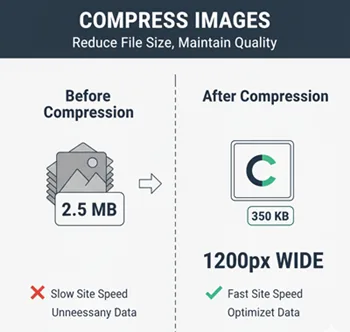
It is good to make image compression the standard part of publishing because it is going to put a heavy load on your website resources if your content is image heavy. Most people would prefer using automated plugins but in some cases, you might want to do it manually before uploading. So, this is your choice but compression can be a good way to reduce the image size to very heavy extents.
Use a Content Delivery Network (CDN)
CDN can significantly improve how fast your images load, no matter where they are in the world. CDN is widely utilized to increase page loading speed by storing copies of your images on multiple servers across different geographic locations. So, when a user visits your site, the images are also delivered to them from the closest locations which help with loading times and latency.
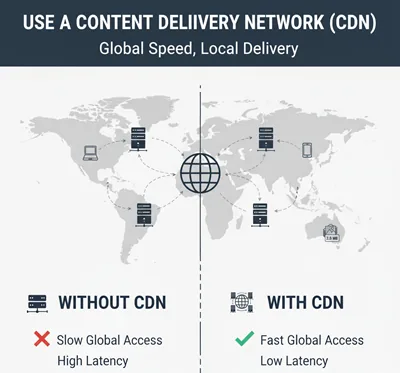
Many CDNs include various image-specific features like compression, WebP integration, lazy loading, and various other optimization features. Using a CDN for your images and the website as whole can enhance your user experience, reduce bounce rates, and contribute directly to user-experience and SEO. You can start off with free platforms like Cloudflare or opt for the hosting-specific CDN services if they support. Most hosting providers will set it up for you for free. But, in some cases, especially as your traffic increases, it becomes important to opt for premium CDNs.
Enable Lazy Loading
Lazy loading means that images are only loaded when they are about to appear on a visitor’s screen, rather than all at once when the page loads for the first time. Enabling lazy loading for images is an easy way to improve page speed in WordPress or any other platform. This reduces initial load time, especially on the pages with lots of images.
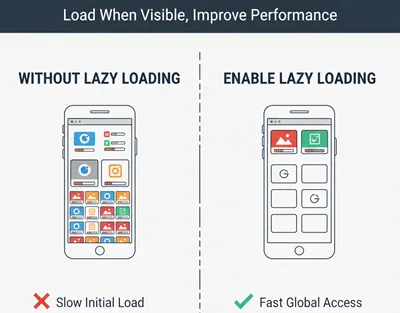
By delaying the loading of off-screen images, lazy loading just loads teh critical content when it is required. With this, it improves both user experience and SEO performance. WordPress has built-in feature for lazy loading the images but you can use numerous plugins or as discussed earlier, utilize the CDN feature to customize how your images load.
Add Proper Image Metadata
Adding proper metadata to your images is often overlooked and underestimated but it can greatly enhance your SEO performance accessibility of the site. Metadata includeds things like image title, caption, description, and alt text. All this data is important for the search engines to understand the context and content of any image. It also makes your site more accessible for visually-impared visitors.
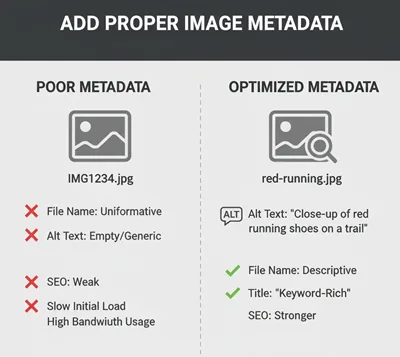
White metadata isn’t important for page loading speed, it is the most important thing for image SEO optimization.
Conclusion
All the performance and SEO optimization features, when combined with a good On-Page and Off-Page SEO strategy will help you with your overall marketing goals. Employing these features is pretty easy and we may go in-depth with the tutorials in the future. But, for now, we how you have understood the different methods to optimize your images for both SEO and speed.