
A security plugin is critical for any WordPress site because it acts as your first and often only line of defense against hackers, malware, spam, and brute-force attacks.
WordPress’s popularity makes it an easy target, and vulnerabilities can come from outdated plugins, themes, or weak passwords. Security plugins monitor your site for malware, suspicious file changes, and unauthorized access, while providing features like firewalls, login protection, and alerts for unusual activity.
You can easily start with Free plugins like WordFence, All-in-One security, Sucuri, and JetPack if you do not want to spend money on them. However, make sure to have it activated all the time. I have a first-hand experience of a literal hack that happened due to a plugin and the site has no defense. So, let me tell you what actually happened.
How I ended up in a trouble because of an outdated plugin?
It was 2022 and I was working solely on my blog. It was earning well and I had no issues paying for a dedicated server, a paid theme, and some other services. But, to keep my website running fast and light, I had just five plugins enabled. One was for SEO and at that time I was a big fan of Yoast. However, now I am more inclined towards Rank Math. Other plugins were Google SiteKit, Spectra, LiteSpeed Cache, and one for adding pros and cons to the articles.
Because I was new to WordPress, I didn’t care much about a security plugin. Because everything was fine and the pagespeed score was always above 90, I was happy with the setup.
However, one day, as I open my search console, I saw a huge spike in the indexed pages. When I opened the report, there were around five hundred thousand pages indexed on my website. However, I had only 200 articles published on my blog.
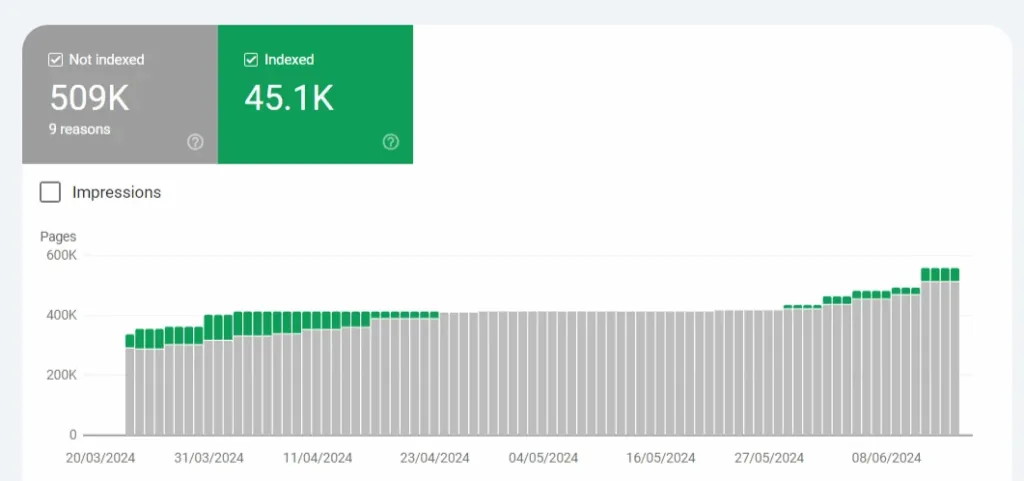
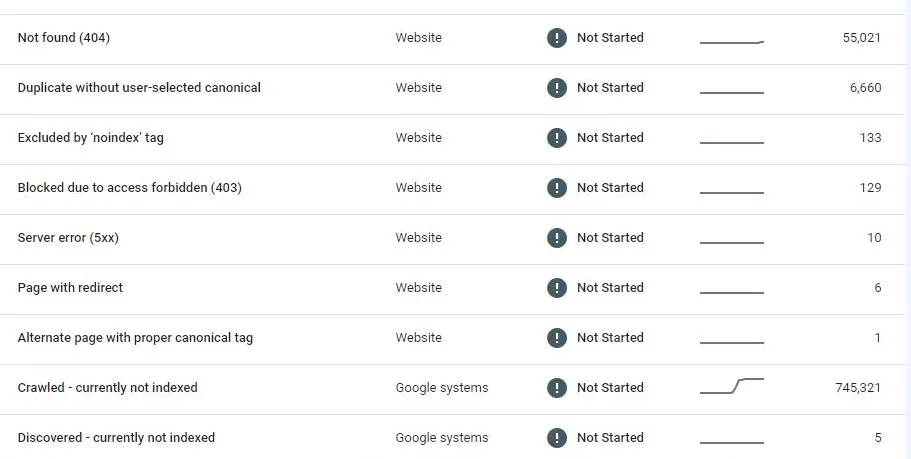
After a day, most of them were marked as Crawled-currently not indexed by Google but a lot of them were still appearing on Google.
My traffic plummeted by almost 90% and I knew no way to recovered it. I checked Google for the indexed pages by the site: operator and there were weird links published on my website’s behalf. However, when I opened them, they took me to a 404 page on my website.
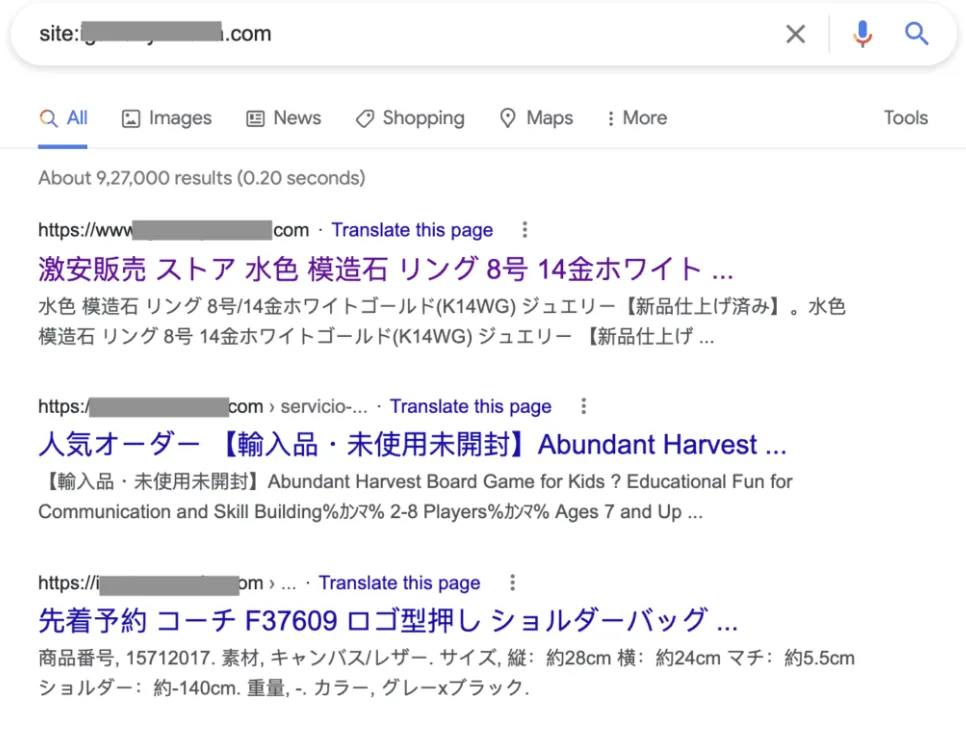
These pages were created automatically and indexed by Google. However, they are not really available on my website. So, researched more about this hack and got to know some ways to fix it. I also posted about in the Google forum and got this answer from an expert.
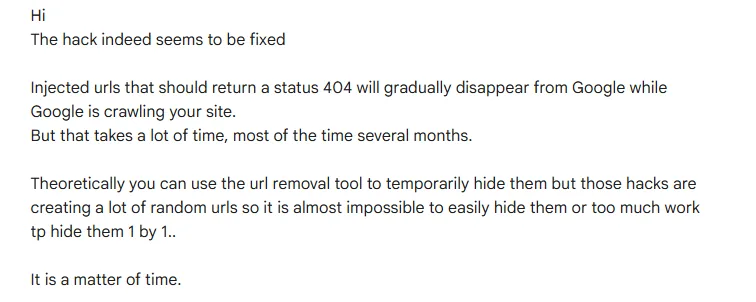
Why it happened?
I got to know that with this type of hack, the hacker will add themselves as a property owner in Search Console to send my audience to their pages which generally go to spammy websites. In other cases, they find volnurabilities through outdated plugins. I believed the same happened with me through the pros and cons plugin.
So, I had got the message from that plugin developer that they have stopped working on it. However, if I uninstalled it from my website, all the Pro and Cons tables would have been gone. So, I postponed that and keep running my website with that outdated plugin. I am not entirely sure but this is how the hacker got inside the website and did all this.
All in all, it was a real security issue and the damage had happened. The traffic had gone and I had to find a way to recover it.
Impact of Japanese Keyword Hack
In most cases, these spam pages will give you 404 errors but they could work as cloaked pages. So, you might not be able to open them but some users might be redirecting to certain pages.
According to Google:
“Cloacking is a practice of presenting different content to users and search engines with the intent to manipulate search rankings and mislead users“
It comes under the prohibited activities in the Google’s spam policies. Any site that does this for any reason (even if hacked) can be penalized by Google and the rankings will surely go down. The same happened with me.
What I did after that?
First of all, I installed and activated the WordFence plugin and got its paid membership. It also helped me remove the malware and clean the website.
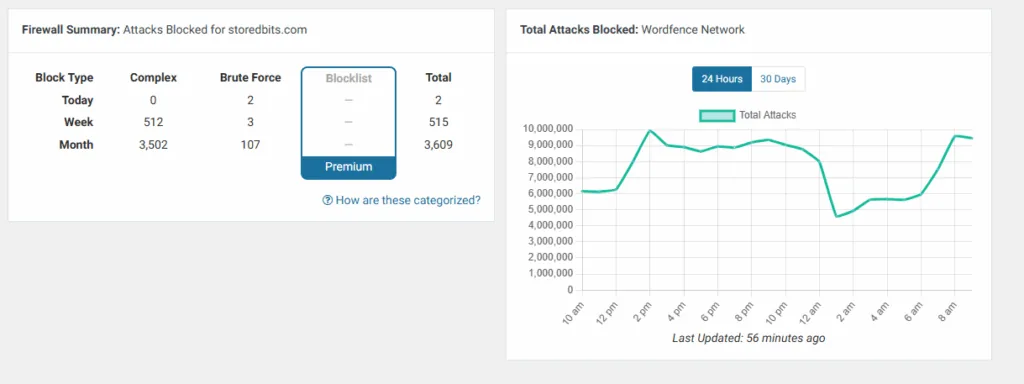
Because there was no way to manually remove all those spammy links, I waited for around 4 months for the Google to remove those links from my property and till then, I did nothing else on it.
The traffic never came back to those article but as I start working on it again, the new articles gained traction soon and I was able to work on it again.
This Japanese Keyword hack resulted in a huge time and money loss. But, it teaches me a very important lesson that no CMS is foolproof. If you are using WordPress for any website, it is important to keep it updated along with the plugins. Also, having a security plugin is really very important.
Conclusion
It is best to have a security plugin active on your WordPress website. It may seem safe and secure but these issues can happen anytime. Also, make sure to keep the WordPress and all the plugins up-to-date.